
Subs Factory — Editor de subtítulos
¡Subs Factory hace que subtitular sea fácil! Es una utilidad completa para la creación, modificación y resincronización de subtítulos. Con funciones avanzadas, te permitirá hacer eficazmente lo que desees con tus subtítulos.
Está diseñado para el formato .srt, pero también puede funcionar con algunos otros formatos.
Funciones
- Creación, eliminación y modificación de subtítulos (texto, duración, tiempo, tamaño, color,...).
- Resincronización muy sencilla mediante la elección de dos subtítulos de referencia.
- Creación automática de subtítulos mediante reconocimiento de voz (requiere compra dentro de la aplicación; prueba gratuita).
- Traducción automática a más de 100 idiomas (requiere compra dentro de la aplicación; prueba gratuita).
- Los cambios pueden verse inmediatamente en el vídeo.
- Compatible con numerosos tipos de códecs de video y audio.
- Potente línea de tiempo que muestra los subtítulos y las formas de onda del audio.
- Trabajar solo con el teclado es fácil, gracias a sus numerosos atajos, totalmente personalizables.
- Verificación en tiempo real del cumplimiento de los estándares de subtitulado (con ajustes modificables).
- Divide y combina subtítulos y archivos de subtítulos.
- Extracción de subtítulos desde un archivo de video (solo pistas SubRip/SRT).
- Función avanzada de búsqueda y reemplazo.
- Gestión de la codificación de los archivos.
- Transformación de texto en subtítulos.
- Abre varios archivos de subtítulos uno al lado del otro (por ejemplo, para resincronizar o traducir)
- Abre y exporta en .srt (SubRip), .sub (MicroDVD, subtítulos indexados por número de imagen), .txt (texto simple) o .tsv (compatible con la mayoría de las hojas de cálculo).
- Creación de formatos de exportación personalizados.
- Vista previa con Quick Look de los archivos de subtítulos y de los proyectos de Subs Factory desde el Finder.
- Soporte para el modo oscuro.
- Compatibilidad total con Touch Bar.
- Funciones completas de reproducción de video (incluyendo archivos multipista, cambio de velocidad y reproducción hacia atrás).
- Se incluye un manual del usuario (échale un vistazo).
- En español, francés e inglés.

Subs Factory
Captura de pantalla
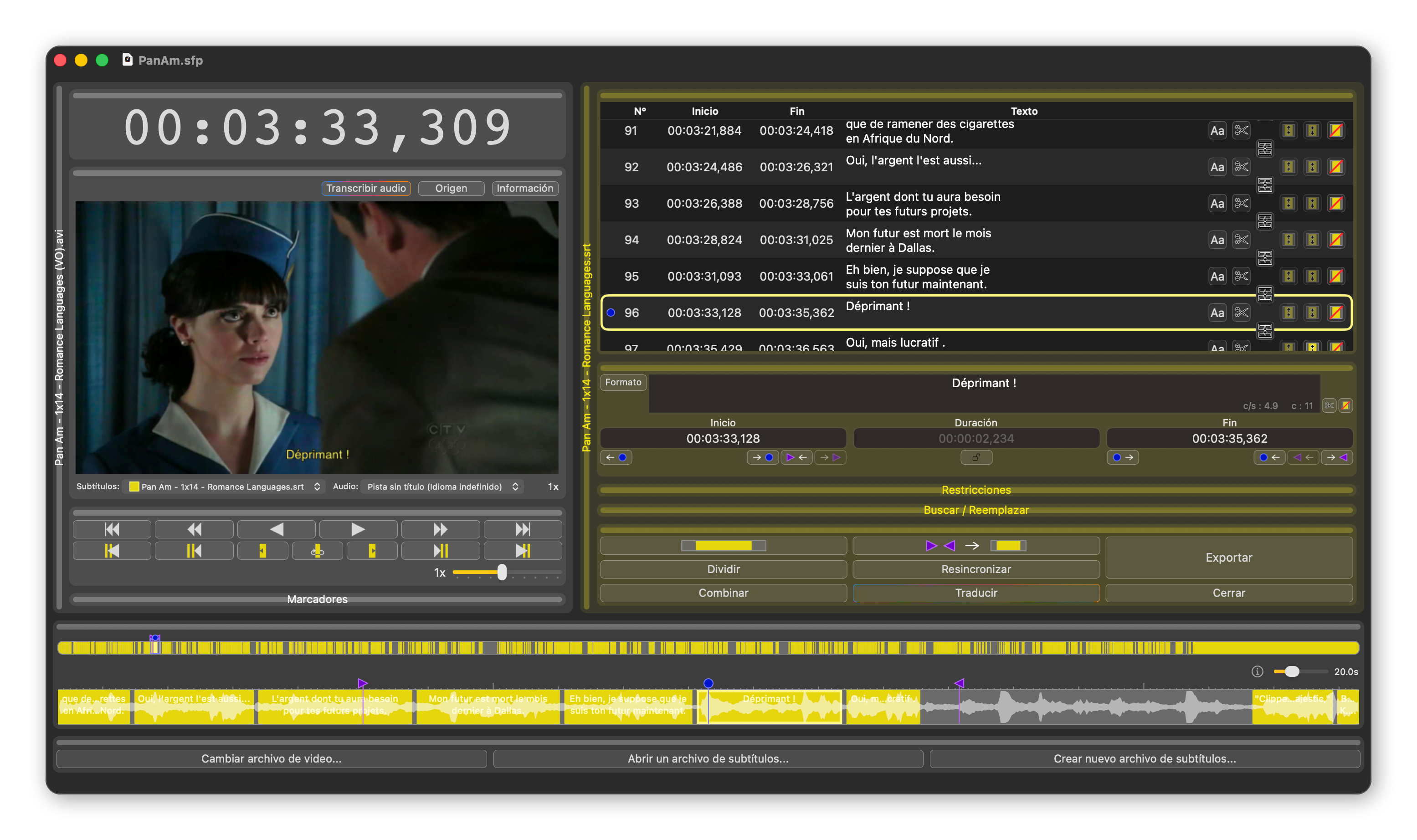
Haz clic en la imagen para ampliarla.
Requisitos del sistema
-
Para la versión 2.11.2 :
- macOS 12.4 (Monterey) o posterior
-
Para la versión 2.8.1 :
- macOS 10.13 (High Sierra) o posterior
-
Para la versión 2.5.2 :
- macOS 10.12 (Sierra) o posterior
-
Para la versión 2.2.1 :
- macOS 10.11 (El Capitan) o posterior
-
Para la versión 2.1.5 :
- macOS 10.9 (Mavericks) o posterior
-
Para la versión 2.0.3 :
- macOS 10.6.8 (Snow Leopard) o posterior
- Para la versión 1.3.2: ver el sitio dedicado
Para que un archivo pueda abrirse o guardarse con Subs Factory, debe estar en formato .srt.
Una vez creados tus archivos de subtítulos, puedes reproducirlos con software gratuito como IINA o VLC.
Historial de versiones
-
Version 2.11.2
Disponible para macOS 12.4 (Monterey) y versiones posteriores-
Correcciones :
- Se corrigieron tres posibles cierres inesperados.
- Actualización de la ayuda.
-
Correcciones :
-
Version 2.11.1
Ya no disponible, reemplazada por una versión posterior-
Novedades :
- Vista previa con Quick Look de los archivos de subtítulos y de los proyectos de Subs Factory desde el Finder.
-
Correcciones :
- Se corrigió un cierre inesperado al abrir la aplicación en las Mac con procesador Intel.
- Pequeñas correcciones de la interfaz gráfica.
-
Novedades :
-
Version 2.11
Ya no disponible, reemplazada por una versión posterior-
Novedades :
- Los atajos de teclado ahora son totalmente personalizables.
- Los botones de las filas de la tabla de subtítulos ahora están ocultos para dejar más espacio al texto: muéstralos pasando el cursor sobre el icono al final de la fila.
- Multiselección de subtítulos, que permite acciones en grupo (desplazamiento, eliminación, formato, combinación).
- Ahora se pueden cortar, copiar y pegar subtítulos, incluso hacia y desde editores externos.
- Nuevo menú contextual al hacer clic derecho en la línea de tiempo.
-
Correcciones :
- Mejor detección del clic simple en la línea de tiempo.
- La ventana que solicita la codificación ya no aparece para los archivos cuya codificación es segura.
- El video ahora se muestra en resolución retina en las pantallas compatibles.
- Numerosas pequeñas mejoras en la interfaz de usuario.
- Numerosas mejoras de rendimiento.
- Numerosas otras correcciones de errores.
-
Novedades :
-
Version 2.10
Ya no disponible, reemplazada por una versión posterior-
Novedades :
- ¡Nueva ventana de resincronización, ampliamente mejorada y que ahora incluye una vista previa!
- Ahora se puede dividir o combinar un subtítulo con un solo clic.
- Ahora solo es posible traducir un segmento de subtítulos.
- Ahora es posible pegar como texto sin formato.
- La tabla de subtítulos evoluciona y ahora contiene botones de acción para cada subtítulo.
- Ventanas de traducción, transcripción y tienda optimizadas.
- Subs Factory ahora también está localizado en español.
-
Novedades :
-
Version 2.9.1
Ya no disponible, reemplazada por una versión posterior-
Correcciones :
- In some rare cases, Subs Factory would refuse to open .srt files. Now I've convinced it.
- The « Always edit last displayed subtitle / Always display edited subtitle » setting was not taken into account when the video was playing. Now it is.
-
Correcciones :
-
Version 2.9
Ya no disponible, reemplazada por una versión posterior-
Novedades :
- Transcription is finally here! Use the “Transcribe Audio” button in the video panel to automatically generate your subtitles!
- Audio files without video are now supported.
- New icon.
- Added time formats using a period instead of a comma.
-
Correcciones :
- Various bug fixes and potential crash fixes.
- Various minor performance improvements.
- Various cosmetic fixes related to macOS 26.
-
Novedades :
-
Version 2.8.1
Disponible para macOS 10.13 (High Sierra) a 11 (Big Sur)-
Novedades :
- Some improvements under the hood to prepare for the future.
-
Novedades :
-
Version 2.8
Ya no disponible, reemplazada por una versión posterior-
Novedades :
- Corrupted .srt files can now be corrected right in Subs Factory, thanks to a new dedicated interface.
- Subs Factory is now universal: it runs natively on both Intel and Apple Silicon processors.
- Modern video formats: .webm files and AV1 encoded tracks can now be read.
- Sentry is now used instead of AppCenter to collect anonymous crash and usage data.
-
Correcciones :
- The timeline was somewhat misaligned for some audio formats, it has now pinpoint accuracy.
-
Novedades :
-
Version 2.7.7
Ya no disponible, reemplazada por una versión posterior-
Correcciones :
- Fixed a crash at launch, mainly under macOS version 14.3.
-
Correcciones :
-
Version 2.7.6
Ya no disponible, reemplazada por una versión posterior-
Correcciones :
- Video files with a track that cannot be decoded by ffmpeg now display waveforms, and their subtitles can be extracted.
- All fields in the resynchronization popover are now accessible by the tab key.
- When entering a time in standard format, if more than three digits are entered after the comma, the last ones are ignored.
- In the case where a subtitle track does not have any subtitle, the track is no longer automatically deselected during playback.
- In the resynchronization summary sentence, the indication of the affected subtitles is now correct.
- Several causes of crashes have been eliminated.
-
Correcciones :
-
Version 2.7.5
Ya no disponible, reemplazada por una versión posterior-
Correcciones :
- Timeline now works under macOS 14 Sonoma.
-
Correcciones :
-
Version 2.7.4
Ya no disponible, reemplazada por una versión posterior-
Novedades :
- Characters counts are now displayed for each line as well.
- More playback speed steps.
-
Correcciones :
- Colors with transparency (8 hexadecimal digits) loading from .srt files do not make the application crash anymore.
- Video origin change is now immediately reflected on the interface.
- Subtitles edition field readability improved.
- Several crash causes should be fixed (including with search/replace).
- Interface was incorrectly stating "microseconds" instead of "milliseconds" (no functional change).
-
Novedades :
-
Version 2.7.3
Ya no disponible, reemplazada por una versión posterior-
Correcciones :
- UTF8-encoded subtitles files starting with BOM character can now be opened correctly.
-
Correcciones :
-
Version 2.7.2
Ya no disponible, reemplazada por una versión posterior-
Correcciones :
- A crash cause has been eliminated.
-
Correcciones :
-
Version 2.7.1
Ya no disponible, reemplazada por una versión posterior-
Correcciones :
- Subtitles on two lines are now correctly parsed from an srt file.
-
Correcciones :
-
Version 2.7
Ya no disponible, reemplazada por una versión posterior-
Novedades :
- Now subtitles can be simply formatted (bold, italic, color, size,...).
- Subtitles can now be displayed in white instead of the track color.
- Palettes organization is now saved in project files.
- It is now possible to use mouse or trackpad scrolling when the pointer is over the timeline or the counter.
- Subtitles can now be translated from the "Create new subtitles..." button.
-
Novedades :
-
Version 2.6.1
Ya no disponible, reemplazada por una versión posterior-
Correcciones :
- A bug has been fixed.
- Some other little tweaks.
-
Correcciones :
-
Version 2.6
Ya no disponible, reemplazada por una versión posterior-
Novedades :
- New automatic subtitles translation feature (needs In-App purchase).
- Subtitles extraction from video file (SubRip/SRT tracks only).
- Defining the video beginning timing.
- Display information about the opened video file.
- Graphical improvements of the timeline for more readability.
- New subtitles default duration can now be set in the preferences.
- New icon.
-
Correcciones :
- "Stop edition" now works even if editing field does not concern subtitle.
- In french translation, in the new project window, buttons "Open" and "Create" were inverted.
- Some other little fixes.
-
Novedades :
-
Version 2.5.2
Disponible para macOS 10.12 (Sierra)-
Correcciones :
- Corrects a bug affecting some users, where menus were not filled in export popover.
-
Correcciones :
-
Version 2.5.1
Ya no disponible, reemplazada por una versión posterior-
Correcciones :
- Two crash causes eliminated, including one concerning the search/replace function.
-
Correcciones :
-
Version 2.5
Ya no disponible, reemplazada por una versión posterior-
Novedades :
- Export subtitles in the format of your choice thanks to the new "Custom export formats" function !
- Check your subtitles readability with the new "Maximum characters per second" constraint.
- Simple display of characters count and characters per second in the edition field.
- Create subtitles by option-click-and-drag in the timeline.
- Delete subtitles and markers by option-click in the timeline.
- Loop play on current subtitle.
- Switch to subtitle edition with a keyboard shortcut or a double-click.
- Click in timeline to go to timing.
- Some graphical interface refinements.
-
Correcciones :
- Controls to move amongst subtitles are now related to selected subtitle track.
- "Go to previous subtitle" button now works correctly.
- Timeline is now correctly updated when project changes length.
- Clicking on a subtitle in the timeline goes to clicked location and not to beginning of subtitle anymore.
- Graphical update for hiding palettes.
- Other bug fixes.
- Some performance improvements.
-
Novedades :
-
Version 2.4.4
Ya no disponible, reemplazada por una versión posterior-
Correcciones :
- Waveforms now appear correctly for files where soundtrack is before video track.
- Output .srt format has been fixed.
- Unimplemented text format removed from export menu.
-
Correcciones :
-
Version 2.4.3
Ya no disponible, reemplazada por una versión posterior-
Correcciones :
- A rebellious crash cause finally eliminated.
-
Correcciones :
-
Version 2.4.2
Ya no disponible, reemplazada por una versión posterior-
Correcciones :
- Two crash causes eliminated.
- A missing translation added.
-
Correcciones :
-
Version 2.4.1
Ya no disponible, reemplazada por una versión posterior-
Correcciones :
- Interface was blurred under macOS 10.14 (Mojave). It is now crystal clear as expected.
- Two other crash causes eliminated.
-
Correcciones :
-
Version 2.4
Ya no disponible, reemplazada por una versión posterior-
Novedades :
- Subtitles and markers can now be modified by dragging in the timeline.
- Subtitle text can now be displayed in the timeline, and waveforms can be hidden.
- Files can now be added to the project by drag-and-dropping them into the window.
- Subtitle file encoding is now detected automatically.
- Detailed timeline scale can now be changed.
- Palettes have been reorganised to dedicate more room to the content and timeline.
- Palettes list can now be accessed via the menu.
-
Novedades :
-
Version 2.3.2
Ya no disponible, reemplazada por una versión posterior-
Novedades :
- Subtitles display can now be restricted to the normal size, and to the video bounds.
- Subtitle edition can now be independent from subtitle currently playing.
- Edited subtitle is now highlighted in the timeline.
- Clicking on a subtitle in the timeline now selects it for edition.
- Added "Change couples of markers to subtitles" menu and keyboard shortcut.
- Default end marker and default second anchor marker in "ReSync" popover are now set to last marker.
- User's manual has been updated.
-
Correcciones :
- Now correctly selecting the default encoding at export.
- When no video was loaded, clicking on a subtitle made the counter run. Not anymore.
- Fixed a display bug with automatic Dark/Light mode selection.
- Corrected some bugs appearing when video is shorter than subtitles file.
-
Novedades :
-
Version 2.3.1
Ya no disponible, reemplazada por una versión posterior-
Correcciones :
- Fixed annoying bug when deleting subtitle.
-
Correcciones :
-
Version 2.3
Ya no disponible, reemplazada por una versión posterior-
Novedades :
- Now displaying sound waveforms to help positioning subtitles.
- Dark mode (for macOS 10.14 Mojave and higher only).
- Full Touch Bar support.
- Subtitles are now displayed on the video, and markup properties are correctly rendered.
- Subtitles included in video files can now be played.
- Smoother backward play.
- VLCkit has been replaced by mpv/ffmpeg, providing much more functionalities for Subs Factory development.
- New "Subtitle" menu for subtitle edition, with associated keyboard shortcuts.
- Time counter is now editable to quickly go to a precise timing.
-
Novedades :
-
Version 2.2.1
Disponible para macOS 10.11 (El Capitan)-
Novedades :
- MicroDVD (.sub) and Tab Separated Values (.tsv) export.
- Command buttons icons are now retina.
- Using "Enter" when editing a subtitle in the "Editor" palette now creates a new line.
- Text edition in the "Editor" palette now taken into account right away.
- Some other minor bugs fixed.
-
Novedades :
-
Version 2.2
Ya no disponible, reemplazada por una versión posterior-
Novedades :
- Reliability, ease of development, modernity and future-proof: the application has been translated to Swift, and the whole code has been reviewed for more simplicity and a much better ability to evolve.
- Now all actions are undoable : resync, split, merge, replace,...
- User interface improvements for better readability.
- It is now possible to play the subtitles, even without a video.
- Performances improvements.
- Numerous bugs have been fixed.
-
Novedades :
-
Version 2.1.5
Disponible para macOS 10.9 (Mavericks) y 10.10 (Yosemite)-
Correcciones :
- A bug preventing use of "Editor" palette with systems older than macOS 10.14 (Mojave) has been fixed.
- Implementing Internet Access Policy for Little Snitch.
- Some crashes fixed.
-
Correcciones :
-
Version 2.1.4
Ya no disponible, reemplazada por una versión posterior-
Correcciones :
- A bug preventing resynchronization has been fixed.
- A bug altering the display of subtitles table after file split has been fixed.
- A bug happening when no video file was loaded has been fixed.
- Another crash has been fixed.
-
Correcciones :
-
Version 2.1.3
Ya no disponible, reemplazada por una versión posterior-
Correcciones :
- A bug modifying a subtitle date when clicking in the table has been fixed.
- Some other crash causes have been fixed.
-
Correcciones :
-
Version 2.1.2
Ya no disponible, reemplazada por una versión posterior-
Correcciones :
- Some bugs concerning subtitle edition have been fixed.
-
Correcciones :
-
Version 2.1.1
Ya no disponible, reemplazada por una versión posterior-
Correcciones :
- Some bugs have been fixed, including concerning "Search and Replace" function.
-
Correcciones :
-
Version 2.1
Ya no disponible, reemplazada por una versión posterior-
Novedades :
- Most video files are now played natively (thanks to VLCkit, replacing QuickTime).
- Now compatible with systems from macOS 10.9 Mavericks.
- It is now possible to choose which audio or video track to play in multitrack files.
- Latest news are fetched and displayed at application launch.
- Video speed management is now more flexible with J-K-L keyboard shortcuts and new controls on video controls palette.
- More flexible resynchronization function.
- Some bugs have been corrected.
-
Novedades :
-
Version 2.0.3
Disponible para macOS 10.6 (Snow Leopard) a 10.8 (Mountain Lion)-
Novedades :
- It is now possible to choose an encoding when exporting a .srt file,
- the encoding chosen while opening a file is now memorized,
- the encodings list is now much more comprehensive.
-
Correcciones :
- Markers are now correctly saved in project files,
- Subs Factory now correctly asks for saving when closing a project,
- minimum duration of a project without video is now ten seconds,
- palettes list is now always entirely unfolded,
- other minor bugs have been adressed.
-
Novedades :
-
Version 2.0.2
Ya no disponible, reemplazada por una versión posterior-
Correcciones :
- Subtitles files created from scratch can now be exported with Snow Leopard,
- one-key shortcuts (i, o and space) now work correctly,
- ReSync window now works correctly with Snow Leopard,
- there is now a protection preventing entering a subtitle whose end is after its beginning,
- video is now correctly unloaded when changed or when closing the window,
- other minor bugs have been corrected.
-
Correcciones :
-
Version 2.0.1
Ya no disponible, reemplazada por una versión posterior-
Correcciones :
- The markers menu now works,
- m4v files can now be open,
- fixed project video loading after application relaunch,
- fixed export button that did not export correctly, and
- window minimum size now better computed.
-
Correcciones :
-
Version 2.0
Ya no disponible, reemplazada por una versión posterior-
Novedades :
- First version on the Mac App Store, rewritten from scratch and dramatically modernized.
-
Novedades :
-
Versión 1.3.2 y anteriores
Disponible para macOS 10.2 (Jaguar) a 10.5 (Leopard)- Consulta el sitio de la versión 1.

Esta aplicación se desarrolla con cariño por Phylica.
Si tienes algún comentario, sugerencia, error o cualquier otra cosa, no dudes en contactarnos en contact@subsfactory.app.
Para saber más sobre Phylica, no dudes en visitar nuestro sitio web www.phylica.fr.
Si tienes algún comentario, sugerencia, error o cualquier otra cosa, no dudes en contactarnos en contact@subsfactory.app.
Para saber más sobre Phylica, no dudes en visitar nuestro sitio web www.phylica.fr.
Consulta el compromiso de privacidad de Phylica para Subs Factory.
Copyright Phylica, 2013 - 2026. Todos los derechos reservados.
Apple, el logo de Apple, Mac y macOS son marcas registradas de Apple Inc. App Store es una marca de servicio de Apple Inc.
Apple, el logo de Apple, Mac y macOS son marcas registradas de Apple Inc. App Store es una marca de servicio de Apple Inc.