Change a text into subtitles
Functionality description
Subs Factory allows to open .txt files and to change them into subtitles. The text is then splitted into several subtitles, and then distributed along the video. Subs factory takes punctuation into account to split the text as naturally as possible, and the subtitle duration is then computed according to its word count.
This functionality can be used for example in the case of a dictation, of a long speech, and generally when text and video are not correlated...
"Choose text parsing method" window
To use this functionality, you just have to use the "Open a subtitles file" of the "Files" palette, or "Open a file in current project" item of "Project" menu. Then select a text file, this is to say with a .txt extension. The following window should appear (once the correct encoding chosen if necessary).
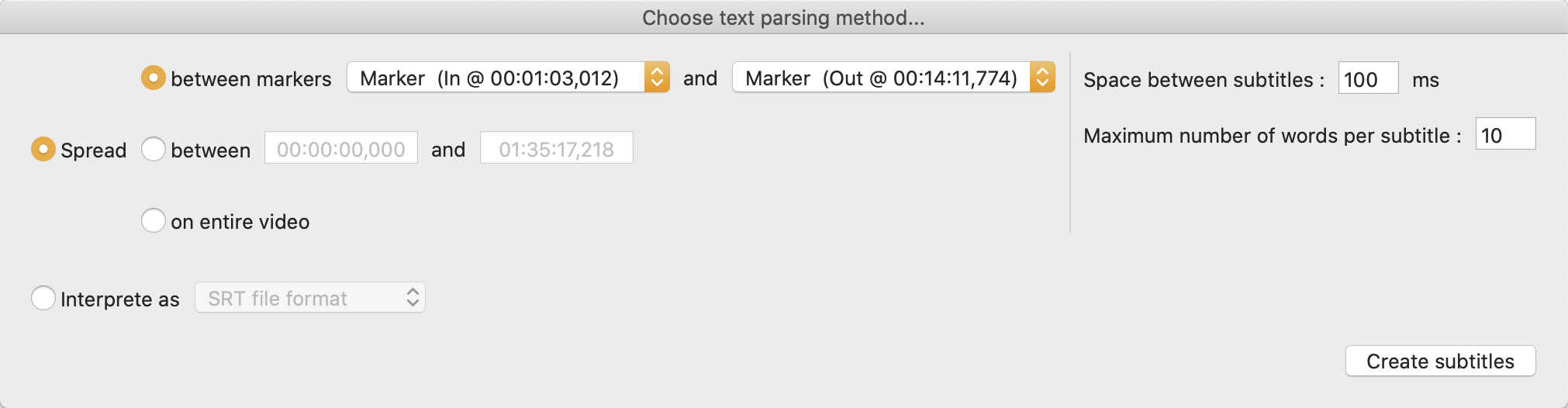
To split the text into subtitles, use the first option, "Spread". Choose the timings, between which the subtitles should be generated : you can use markers if you have created at least two, directly enter timings, or, if a video is loaded, use the whole video length.
On the right, you can choose the spacing between two generated subtitles (in milliseconds), and also the maximum number of words in one subtitle. The final number of words can vary (however respecting this maximum), in order to cope with the punctuation, and not to cut anywhere.
The second option, "Interprete as", allows to read a .txt file as if it was a standard .srt or .sub file (as chosen in the dropdown menu). It sometimes happen that such files have a .txt extension after the correct one.