Constraints
Contents
What is a constraint?
Constraints allow you to check whether the file matches certain rules. These rules ensure the readability of the subtitles when displayed during a video. For example, they have to be displayed long enough. These rules change according to the subtitle language. Some customers also want the supplied subtitles to match their own rules.
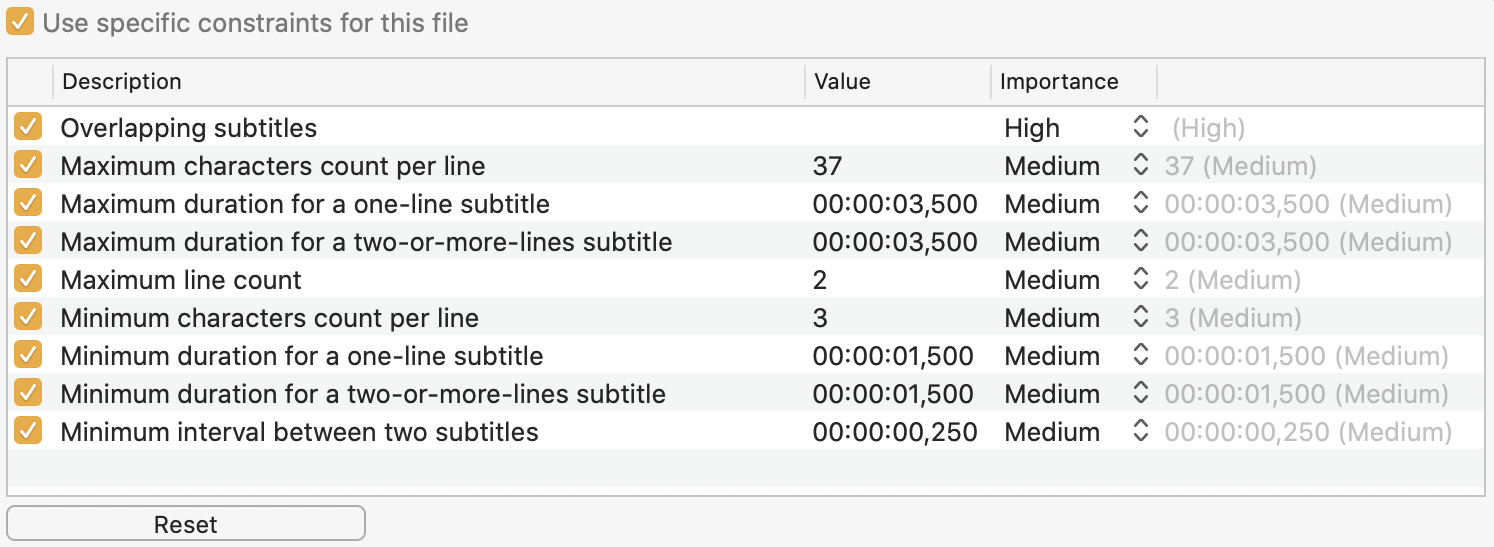
A constraint has a description, a priority and sometimes a value. The description is the text of the constraint, the value is a parameter you can change, and the priority lets you distinguish and sort constraint violations more efficiently. Three priorities exist (high, medium and low). Each one has a color. You can choose the priority of each constraint.
Each constraint can be activated or deactivated thanks to the checkbox located in front of its description. This lets you ignore some constraints.
Default constraints, preferences constraints and constraints specific to a file
Constraints can be modified in two locations in the software:
- In preferences, under "Constraints", you can define the constraints applicable to all open projects in the application. The "Reset to Defaults" button resets the constraints to the Subs Factory defaults, suitable in most cases. Their value is shown in grey in the right column.
- In each project, in the "Constraints" palette of each subtitle file, you can define the constraints that will be specific to the subtitle file by clicking on the "Constraints..." button. This requires checking the box "Use specific constraints for this file". Preferences constraints will then be replaced by those defined for this file. The "Reset to Preferences" button resets these specific constraints to those defined in the preferences. Their values are shown in grey in the right column.